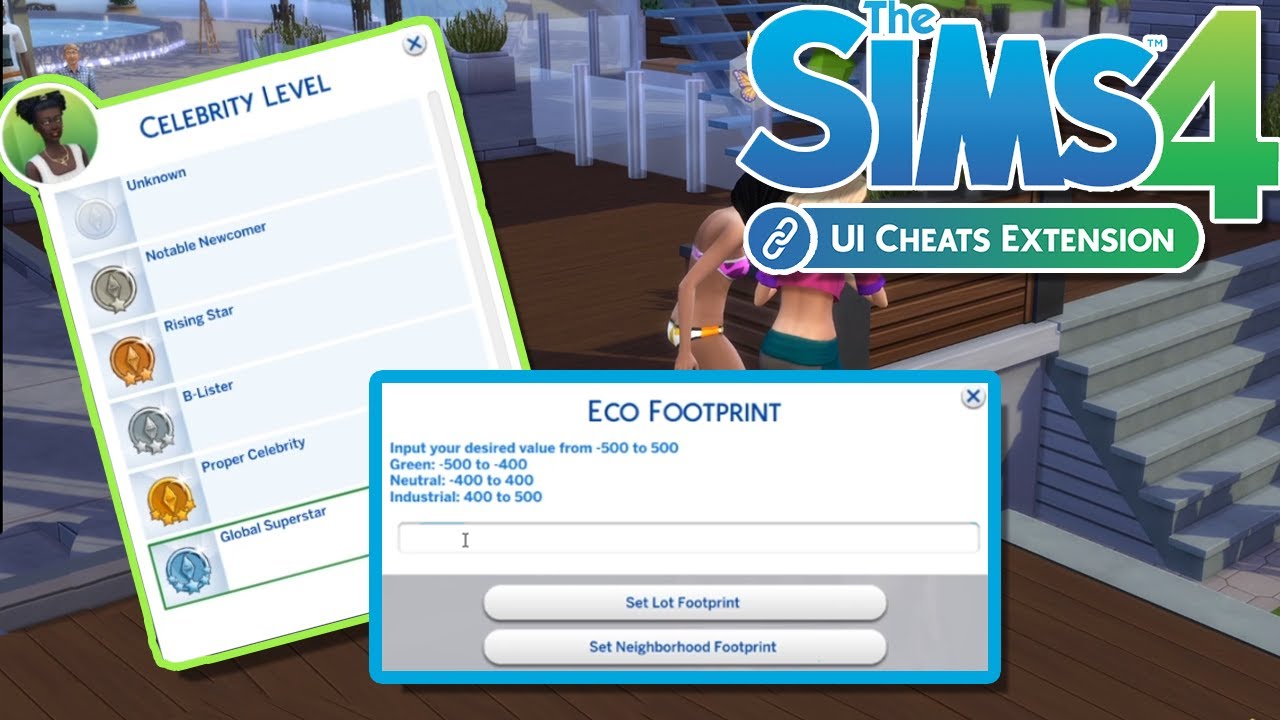
Discover all the essential Sims 4 cheating codes updated for 2026 to elevate your gameplay. This comprehensive guide helps you master money management, boost skills, manage relationships, and access powerful debug tools. Whether you are a casual player or a dedicated builder, these tricks will transform your Sims 4 experience. Learn how to activate codes effortlessly and avoid common pitfalls. Maximize your fun with immediate wealth, perfect careers, and thriving families. Explore everything from basic money cheats to complex object manipulation, ensuring your virtual world is exactly how you envision it. This resource provides valuable insights for both new players and seasoned veterans looking to enhance their game.
Are Sims 4 cheating codes still relevant in 2026, and how do players use them to transform their virtual worlds? Absolutely, these codes remain a powerful tool for enhancing gameplay and storytelling in The Sims 4. Many players, from casual explorers to dedicated builders, find that cheats provide unparalleled freedom. They bypass the grind and allow immediate access to resources, skills, and unique items, which truly elevates the creative possibilities within the game. Imagine instantly building your dream mansion or having a Sim master every career path without the usual time investment. Cheats offer this instant gratification, making your Sims 4 experience uniquely yours.
Understanding the Power of Sims 4 Cheats
The Sims 4 community thrives on customization, and cheats are a cornerstone of that experience. They are not just about making things easier; they are about opening up new avenues for creative expression. Think of them as developer tools handed directly to you, the player, empowering you to shape narratives without limitation. This approach allows players to focus on storytelling or intricate builds rather than constant resource management.
Activating Cheats: Your First Step to Power
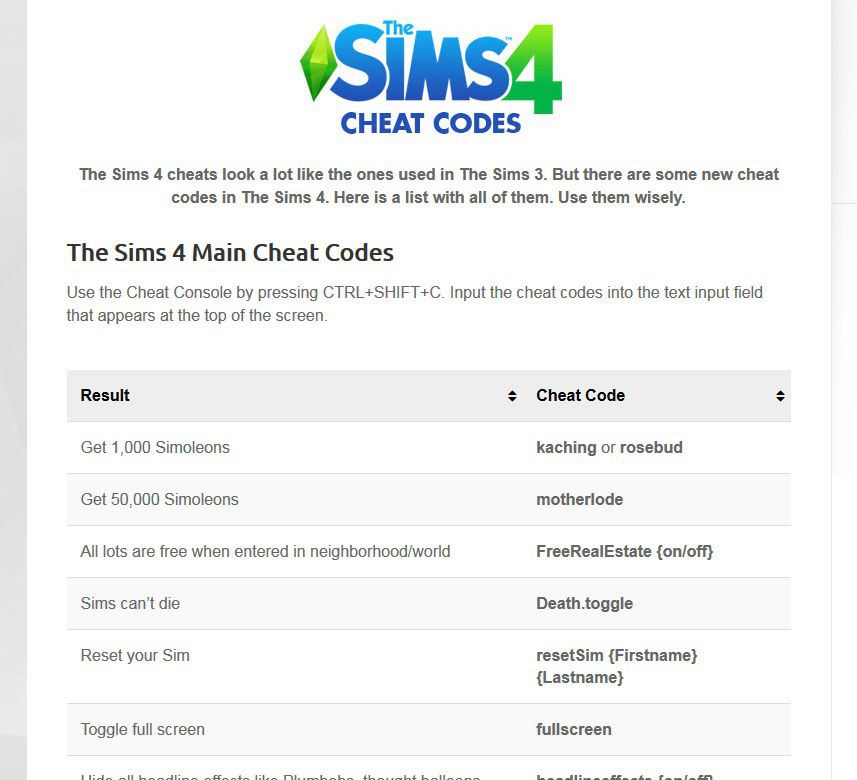
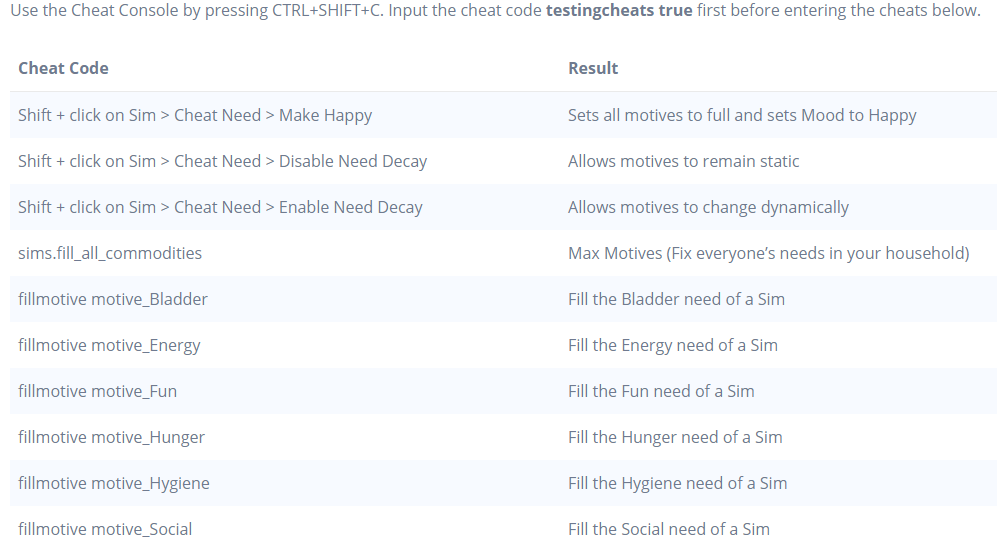
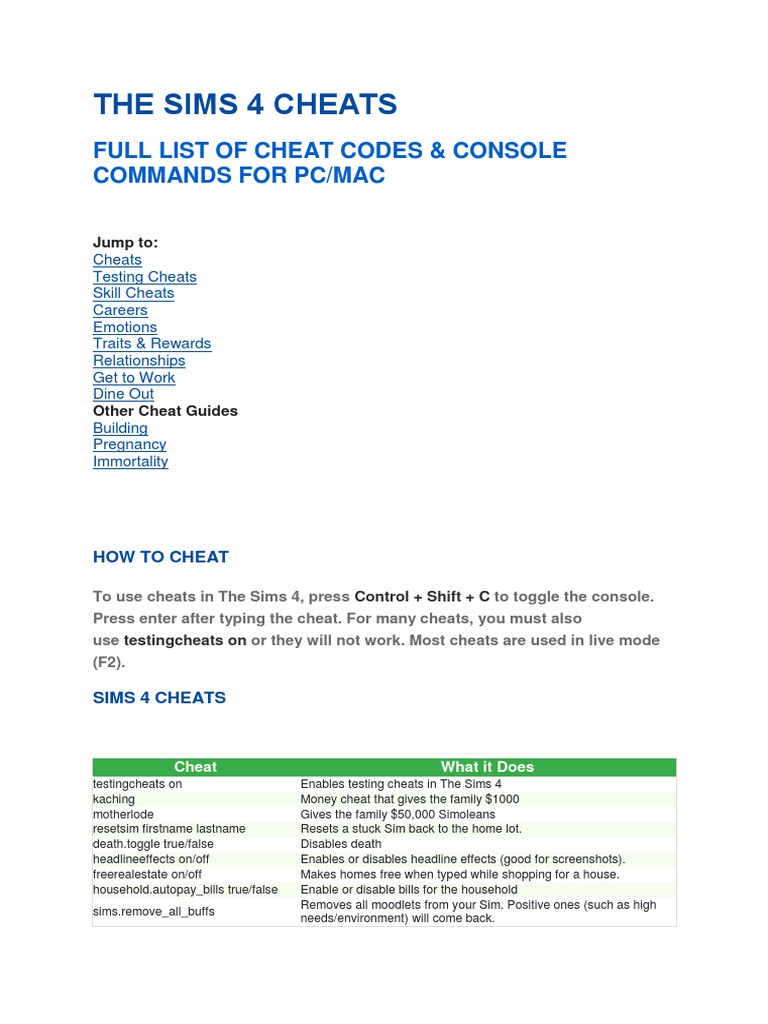
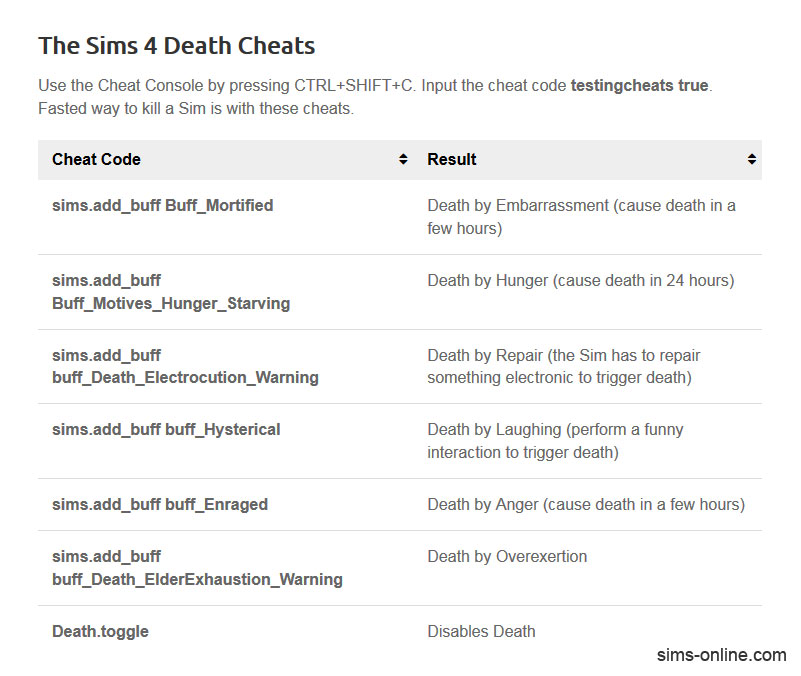
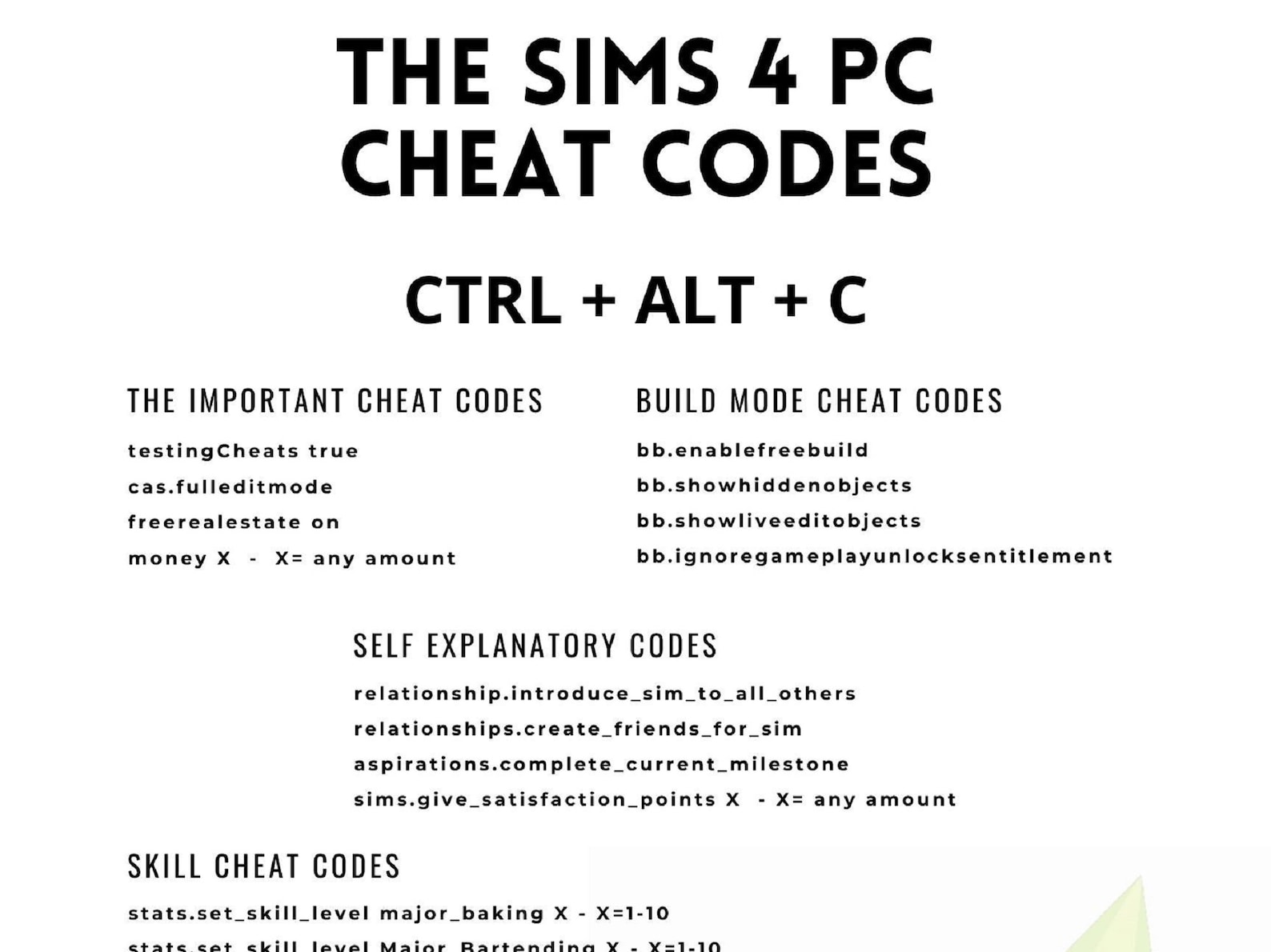
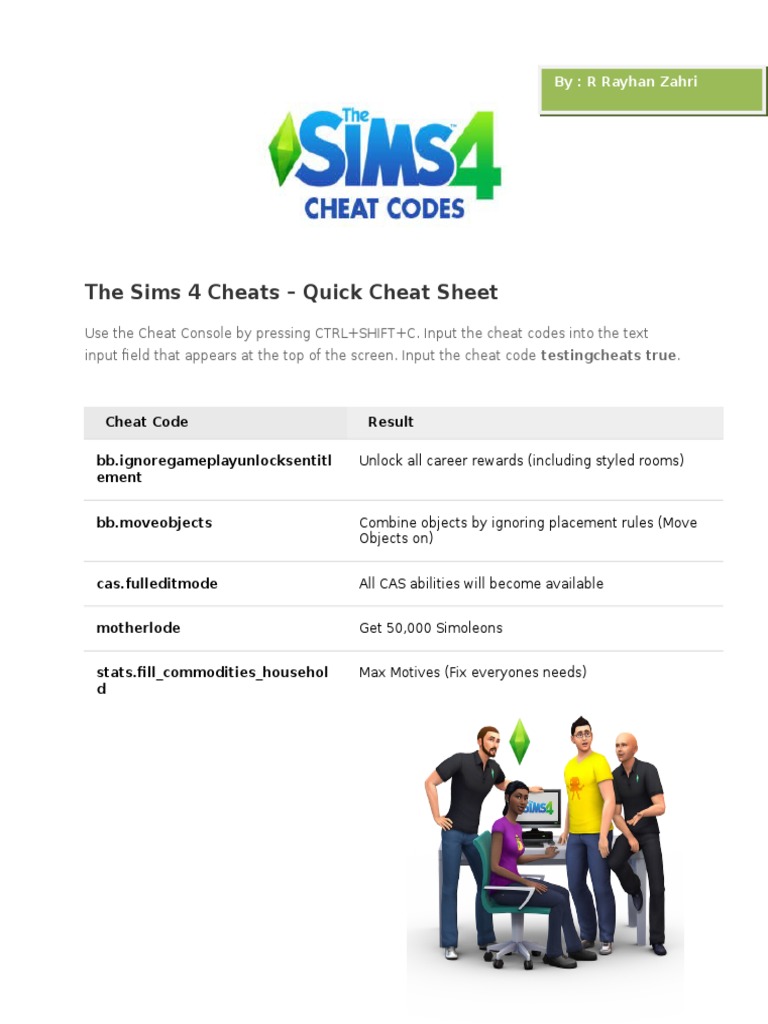
To begin your journey into the world of Sims 4 cheats, you first need to open the command console. This is typically done by pressing Ctrl + Shift + C on PC. Console players will use similar button combinations for PlayStation or Xbox. Once the text box appears at the top of your screen, you are ready to input various commands. The initial command you will frequently use is 'testingcheats true' which activates many advanced cheat functions. Always remember to press Enter after typing each code to ensure it registers correctly in the game. It is a simple step but crucial for success.
- Open the command console using Ctrl + Shift + C on PC.
- Type 'testingcheats true' and press Enter to enable advanced cheats.
- Input specific cheat codes into the console and press Enter.
- Close the console by pressing the same key combination again.
Mastering Money, Skills, and Relationships
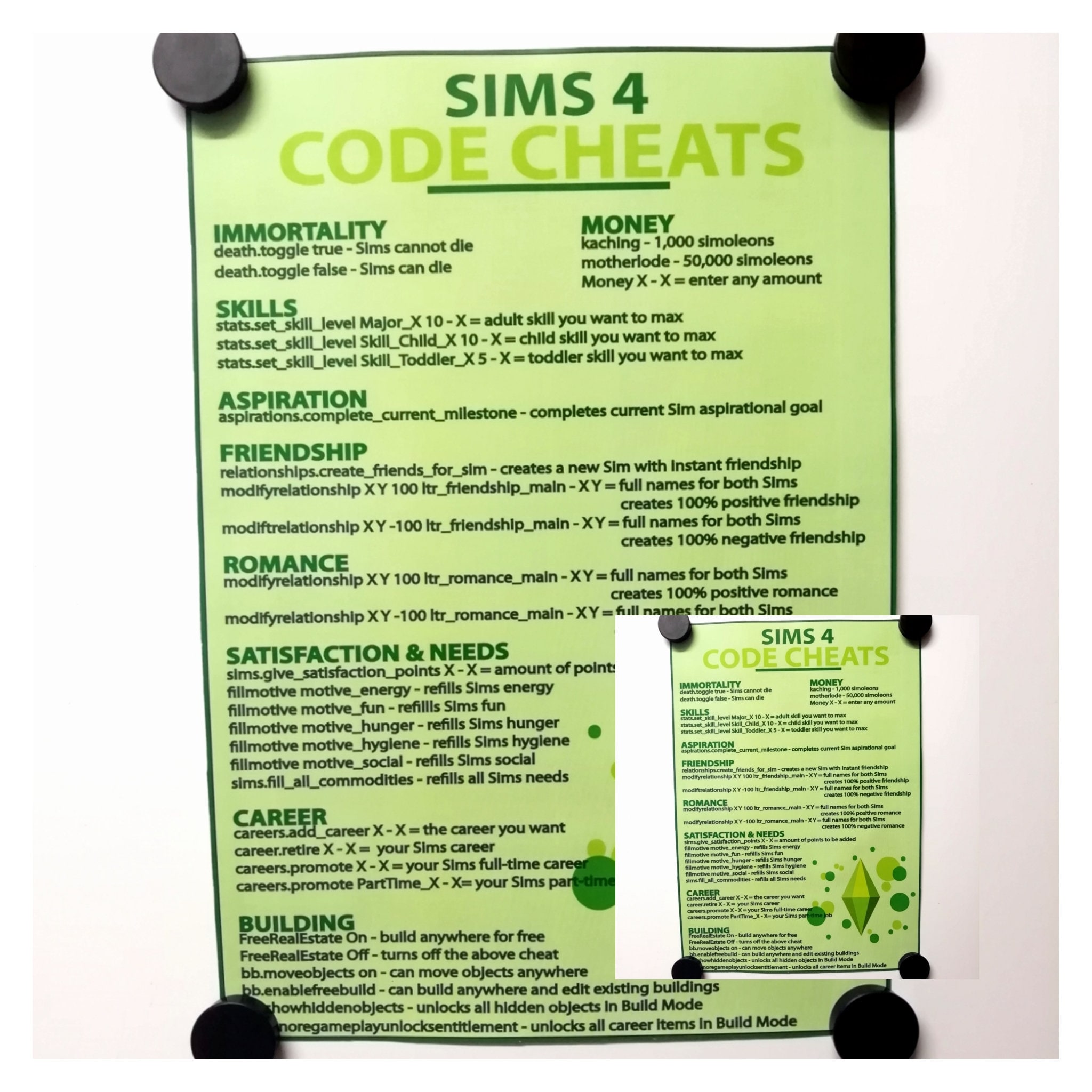
Money cheats are often the first stop for new players seeking immediate gratification. The 'motherlode' code grants a whopping 50,000 Simoleons, instantly solving all financial woes. For smaller increments, 'kaching' provides 1,000 Simoleons, perfect for minor purchases or daily expenses. These financial boosts allow your Sims to live in luxury, build extravagant homes, and pursue expensive hobbies without any struggle. It truly changes the dynamic of the game, letting you focus on other aspects.
Skill and Relationship Management Made Easy
Boosting skills is another popular use of cheats, saving countless hours of practice. You can instantly max out a Sim's cooking, painting, or logic skill with a simple command. This is incredibly useful for specific storyline progression or achieving career goals rapidly. Similarly, managing relationships can be simplified. Cheats allow you to instantly increase or decrease friendship and romantic levels between Sims, crafting complex social dynamics effortlessly. You can create instant best friends or bitter rivals, which adds dramatic flair to your gameplay stories. These tools give you complete control over your Sims' personal growth and social circles.
You know, I get why this confuses so many people when they first start. It feels like there are so many codes to remember. The trick, and this is what I always tell junior devs, isn't about memorizing everything, it's about understanding the core categories. Once you grasp that, you can usually find what you need or even infer similar codes. For example, most skill cheats follow a very similar pattern, making them easy to adapt. You've got this, just keep practicing!
Advanced Cheating Techniques for 2026 Sims
Beyond basic money and skill cheats, The Sims 4 offers a plethora of advanced commands that can fundamentally alter your gameplay experience. Debug cheats, for instance, unlock hidden objects and interactions normally only accessible by developers. These can include anything from unique decor items to specific event triggers, opening up a new layer of customization. The 'bb.showhiddenobjects' and 'bb.showliveeditobjects' commands are invaluable for builders. They reveal thousands of extra items in Build/Buy mode, greatly expanding your design options. It's like finding a secret stash of content.
Manipulating Game State and Debugging
One powerful command is 'cas.fulleditmode', which allows you to fully edit any Sim in Create-A-Sim mode, even after they've been created. This includes changing their traits, aspirations, and physical appearance at any time. This offers unparalleled flexibility for narrative adjustments. From a model's perspective, this level of control in 2026 demonstrates how game engines are designed with inherent flexibility. They anticipate players wanting to bend the rules, which is why these 'backdoor' commands exist. They’re not just bugs, but often intentional design choices for testing and modding. It is truly fascinating to see this evolve.
- Use 'testingcheats true' to enable most advanced cheats.
- Employ 'bb.showhiddenobjects' and 'bb.showliveeditobjects' for hidden items.
- Activate 'cas.fulleditmode' to fully edit Sims after creation.
- Right-click on Sims with 'testingcheats true' active for special interaction options.
This one used to trip me up too, honestly. I'd forget to type 'testingcheats true' and wonder why nothing was working. It's like trying to run a complex script without loading the necessary libraries first, right? The game just won't know what you're asking it to do. My practical tip is to always, always start with 'testingcheats true' and then double-check the spelling of your other commands. A single typo can be the difference between riches and frustration. Try this tomorrow and let me know how it goes.
Common Pitfalls and Best Practices
While cheats offer immense freedom, it is important to use them wisely. Overuse or incorrect application can sometimes lead to unexpected game behavior, or even minor glitches. Always save your game before experimenting with new or complex cheats, providing a safety net if something goes awry. This practice ensures that your hard work and progress are protected. Many players use cheats primarily in specific save files, preserving their main games for un-cheated gameplay. This balanced approach allows for both creative freedom and authentic challenges. It is all about finding what works for your play style.
Keeping Your Game Stable with Cheats
One common mistake is not understanding the persistence of certain cheats. Some, like money cheats, are one-time commands. Others, particularly those affecting game mechanics or object availability, might persist across game sessions until explicitly turned off. Always be mindful of which cheats are active and how they might impact future gameplay. Keeping your game updated to the latest 2026 patches also helps ensure cheat compatibility and stability. The development teams often optimize cheat functionality alongside regular game improvements, so staying current is always a good idea. You'll find fewer unexpected issues this way.
The Future of Cheating in Sims 4 and Beyond
As The Sims 4 continues to receive expansions and updates into 2026, the community constantly adapts and discovers new ways to use and integrate cheats. The relationship between official cheats and player-created mods is also evolving. While cheats are built into the game, mods often extend functionality in ways cheats cannot, offering deeper customization. Expect to see new cheat codes introduced with future packs, expanding the possibilities even further. The Sims franchise has always embraced player creativity, and cheats are a testament to that philosophy. They are a beloved feature that continues to thrive.
Community and Creative Expression
The shared knowledge within the Sims community is a powerful force. Players often collaborate, sharing newly discovered cheat functions and creative applications. This collective ingenuity ensures that the 'cheating codes for Sims 4' ecosystem remains vibrant and dynamic. Forums, social media, and dedicated fan sites are treasure troves of information, constantly updated with fresh tips and tricks. This communal aspect truly enriches the overall Sims 4 experience, making it more than just a game. It is a living, breathing virtual world shaped by millions of players worldwide. The creative potential is truly limitless.
Quick 2026 Human-Friendly Cheat-Sheet for This Topic
- Always start with 'Ctrl + Shift + C' to open the cheat console.
- Type 'testingcheats true' first to unlock most advanced cheats.
- 'motherlode' gives you 50,000 Simoleons instantly for easy cash.
- Use 'kaching' for a quick 1,000 Simoleon boost.
- 'bb.moveobjects on' lets you place items anywhere in Build Mode.
- 'cas.fulleditmode' allows complete Sim editing anytime in Create-A-Sim.
- Remember to save your game before trying new or experimental cheats!
Unlock unlimited money for your Sims, instantly boost skill levels, master relationship dynamics, access hidden build mode features, fix frustrating bugs with cheats, customize gameplay experience dramatically, explore advanced debug functionalities easily.
Dolfmmo Blog Sims 4 Uni Abschl Sse Cheats Die Sims 4 Berufe Karriere Und Jobs Im More Cheats For The Sims 4 Amazon De Appstore For Android 710fxMmNsDL
The Sims 4 Cheats Full List Of Cheat Codes Console Commands For Pc 1707123639Cheat The Sims 4 C Ch Hack Ti N Kh A Ch C N Ng Hot Nh T Hi N Nay 71bUgaF 4lL Steam Community Guide The Sims 4 CheatsThe Sims 4 Cheats Codes Unlockables PDF Cheating In Video Games 1696957482
Cheats Code The Sims 4 Negative Friendship Toddler Skills Sims 4 Ultimate Sims 4 Cheat Codes Commands Guide February 2026 Sims 4 Cheat Codes Cheats For The Sims 4 All Sims 4 Cheat Codes APK For Android Download Screen 5
Cheats For Sims 4 Building At Caitlin Dobson Blog Sims 4 Cheats Codes Sims 4 Challenges Sims 4 Sims 4 Cheats Sims 4 Cheats Complete Codes And How To Activate Them Sims 4 Cheats 1144x644 How To Cheats Sims 4 Skills At Therese Arnold Blog 71a0uhehIeL
Sims 4 Cheat Codes Apk For Android Download Artofit Cheats The Sims 4 Habilidades Mec Nica BRAINCP Sims 4 Cheat Sheet1 By Sykessim Dc1cmxd Fullview Pin By Lindsay Perry On Sims Sims 4 Sims Sims 4 Cheats Sims 4 Cheat Code To Intersect Objects At Cooper Betts Blog Il Trwn
Best 13 Xbox One Cheats The Sims 4 Wiki Guide IGN Artofit Sims 4 Cheat 2026 Sims 4 Cheat 2025 1200x675 Sims4 Cheats Code Artofit Sims 4 Cheat Codes To Get Expansion Packs At Adam Grammer Blog
The Sims 4 Cheats Codes Unlockables Sims Online PDF 1696454765Sims 4 Cheat Code No Needs At Angela Lewandowski Blog Sim 4 Cheat Codes Zoomcave Sims 4 Cheat Codes Master The Art Of Sims 4 Decorating Cheats For Stunning Virtual Interiors Il 4xaq
Sims 4 Cheats Upgrade Parts At Lois Katz Blog Sims 4 UI Cheats Extension Mod Guide How To Install Pillar Of Gaming Sims 4 UI Cheats Extension Mod GuideMotherlode Cheat Sims 4 Zikbingo Img Sims 4 Cheats Code Poster
FREE MONEY CHEATS FOR SIMS 4 By On DeviantArt Free Money Cheats For Sims 4 By Da7gx42 Fullview The Sims 4 Cheats Quick Cheat Sheet 1567085532Sims 4 Cheats