Discover the truth about whether gaming chairs actually improve or harm your posture. This comprehensive guide, updated for 2026, dives deep into ergonomic design, common misconceptions, and practical tips for maintaining spinal health during long gaming sessions. We explore the latest research and expert opinions to help gamers make informed decisions about their seating solutions. Understanding the nuanced relationship between chair design and musculoskeletal well-being is crucial for preventing discomfort and long-term issues. Explore different chair types, adjustment features, and essential sitting habits that truly support a healthy posture. This resource is designed to empower you with knowledge for a pain-free gaming experience, focusing on actionable advice and cutting-edge insights. Learn what makes a difference beyond just aesthetics or brand hype.
Many gamers constantly ask do gaming chairs truly fix posture. It is a question that resonates with countless hours spent immersed in virtual worlds. We often seek ergonomic solutions to combat the aches and pains that accompany long gaming marathons. This popular belief in gaming chairs as posture saviors deserves a closer look. Let us dive into the facts and separate truth from marketing hype. Understanding the intricacies of proper seating is genuinely important for your long-term health. A good chair can offer excellent support but it cannot magically correct deeply ingrained poor habits. We will explore how these specialized chairs genuinely contribute to your overall well-being. It is about making informed choices for your gaming setup and ensuring comfort. Remember, your health is a valuable asset you should protect.
Beginner / Core Concepts
1. Q: What exactly defines good gaming posture?
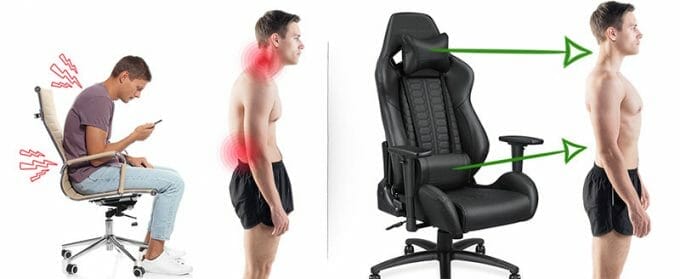
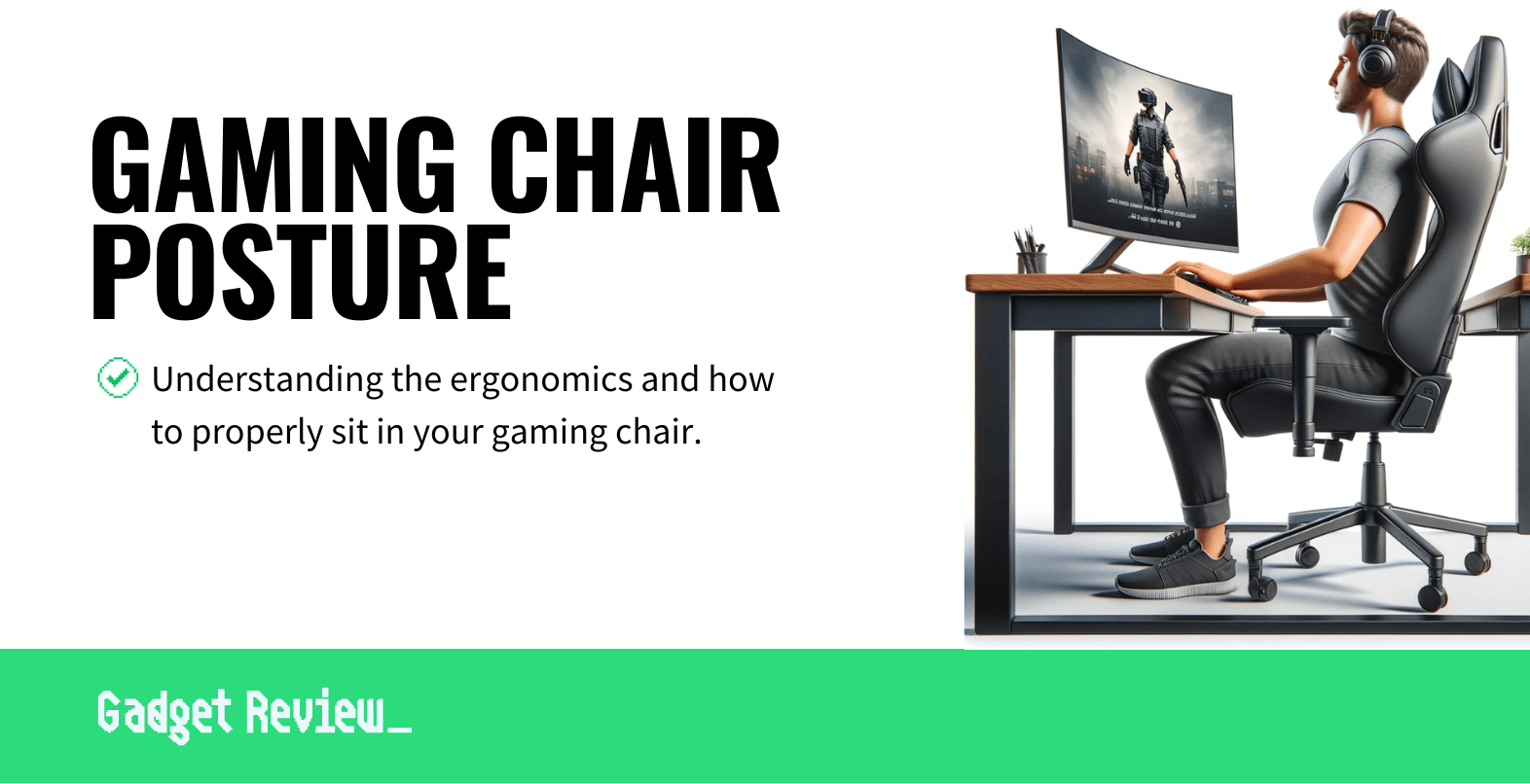
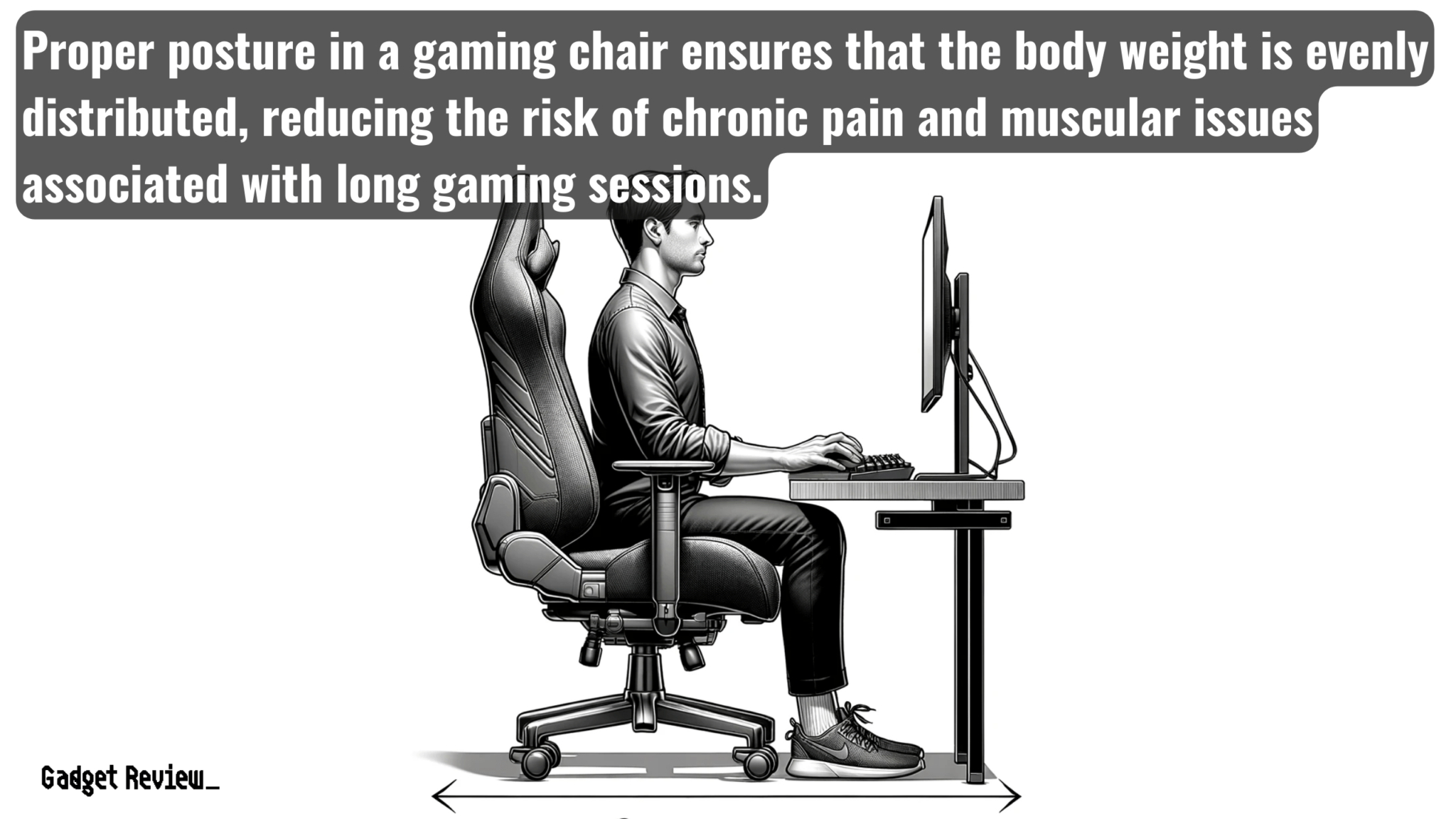
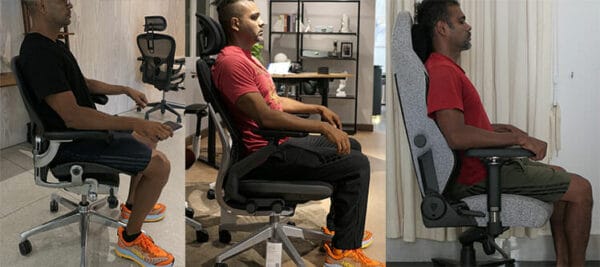
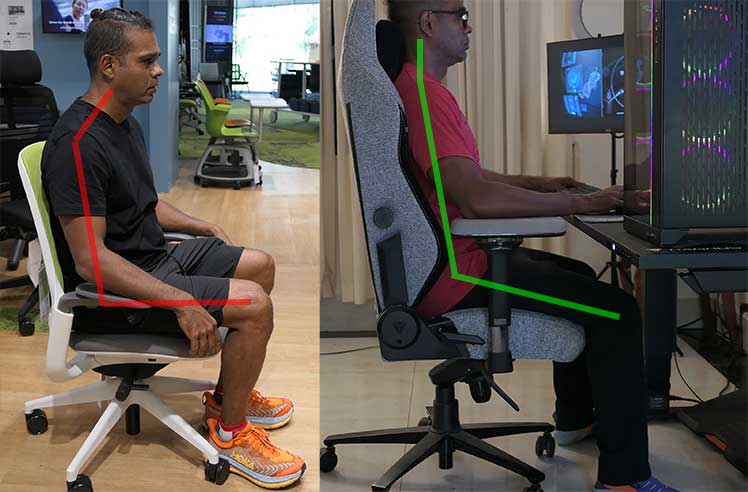
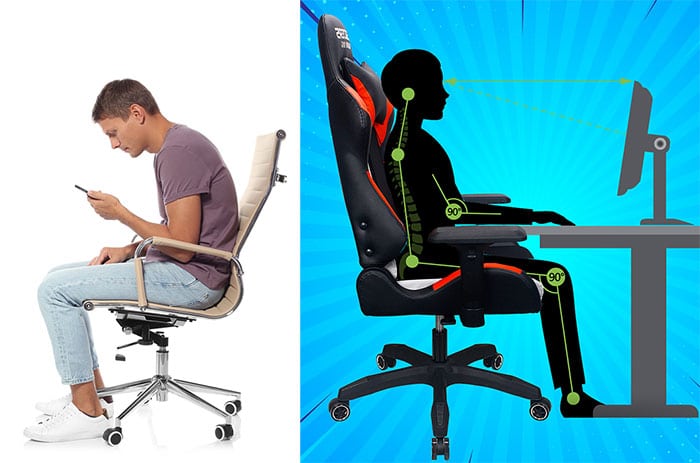
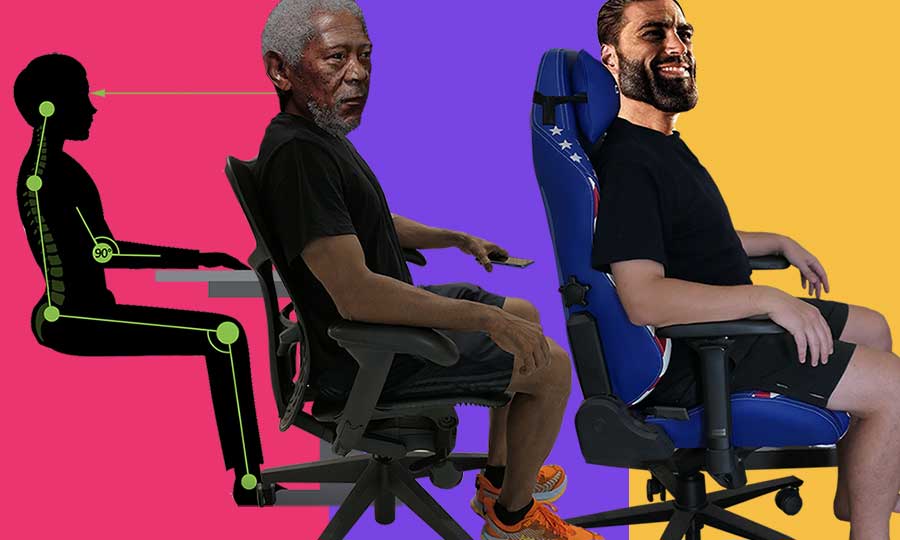
A: Hey there, I get why this confuses so many people, it is not as simple as sitting perfectly straight! Good gaming posture is not about being rigid; it is about maintaining your spine's natural curves while being supported. Think about aligning your ears over your shoulders, and your shoulders over your hips, with your feet flat on the floor. Your arms should form a relaxed 90-degree angle when reaching for your keyboard and mouse. It also means your monitor is at eye level, preventing neck strain. The goal is a neutral spine position where muscles are not overworking, allowing for long-term comfort. This helps prevent fatigue and discomfort during those intense gaming sessions. Ultimately, it is about sustainable comfort and reducing unnecessary stress on your body. You have got this!
2. Q: Can a cheap gaming chair really help my posture, or is it just marketing?
A: This one used to trip me up too, and it is a super common question! Honestly, a cheap gaming chair often provides more aesthetic than actual ergonomic benefit. While it might look cool, truly beneficial chairs focus on adjustable support for your lumbar spine, neck, and arms. Many budget options lack the robust adjustability or quality materials needed to properly support you for extended periods. They might offer some basic cushioning, but they do not actively fix posture. Instead, they might just provide a temporary change without addressing underlying issues. It is often better to save for something with genuine ergonomic features. Think of it as an investment in your gaming longevity. Try this tomorrow and let me know how it goes.
3. Q: Do I need a gaming chair or is an ergonomic office chair better for my back?
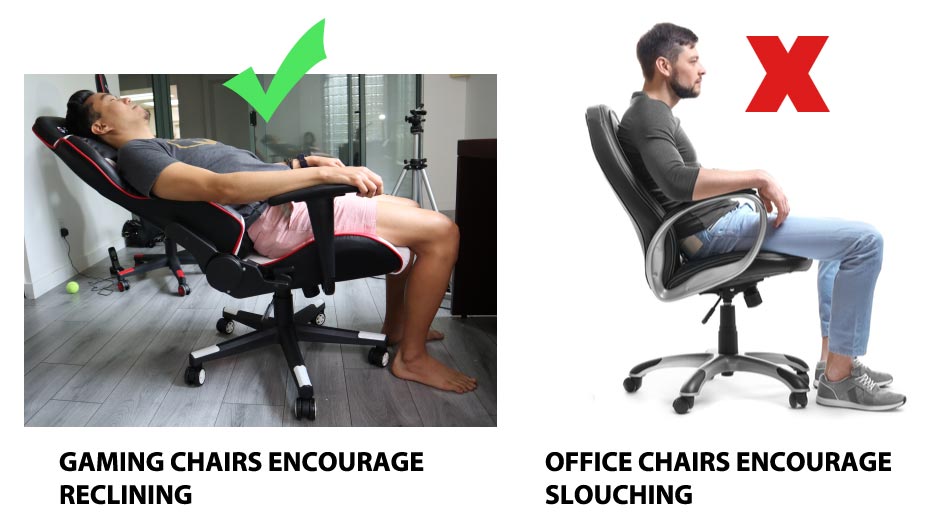
A: That is a fantastic question, and one many gamers wrestle with! Generally, an ergonomic office chair designed by actual ergonomists often provides superior adjustability and support for prolonged sitting. Gaming chairs, while stylish, sometimes prioritize aesthetics over true ergonomic principles. High-end ergonomic office chairs are specifically engineered to promote healthy posture and reduce strain. They often feature more precise lumbar adjustments, better seat depth, and superior material quality for breathability and pressure distribution. Many gaming chairs offer similar features, but their efficacy can vary widely between brands and price points. So, while a good gaming chair can be effective, a well-designed ergonomic office chair is usually a safer bet for pure posture benefits. It is about function first, then form.
4. Q: If gaming chairs do not fix posture automatically, what is their main purpose?
A: Great point! You are right, they are not magic wands. Gaming chairs primarily offer a distinct aesthetic appeal and specialized features often preferred by gamers. These chairs usually provide higher backrests to support head and neck, which is great for leaning back during cinematic moments. They also have side bolsters, reminiscent of racing car seats, which give a snug feeling during intense play. The focus is often on an immersive experience, complementing a gaming setup beautifully. While many incorporate ergonomic elements like lumbar pillows, their main purpose is not inherently posture correction but rather enhanced comfort and style tailored for the gaming environment. They aim to support your body within that specific context.
Intermediate / Practical & Production
1. Q: What specific features should I look for in a gaming chair to support good posture in 2026?
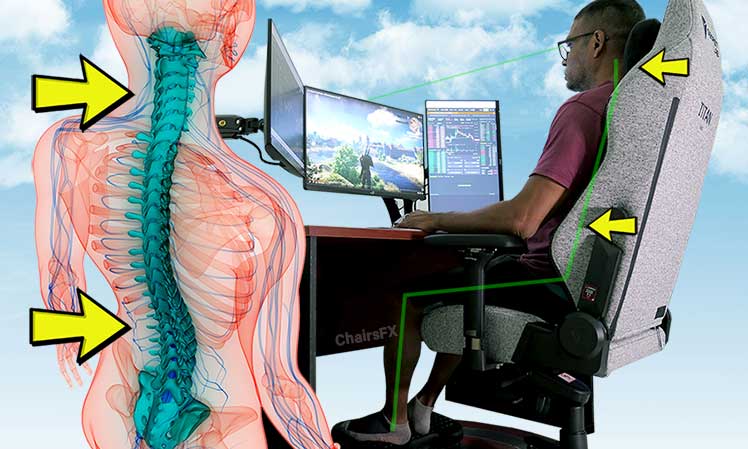
A: Alright, let us get practical here for 2026 tech! You want adjustability, my friend. Look for chairs with multi-directional armrests (4D is ideal) allowing your arms to rest naturally. Crucially, find one with adjustable lumbar support, not just a pillow you strap on. Integrated adjustable lumbar mechanisms are far superior. Seat tilt and depth adjustment are also key; you need to properly fit the chair to your unique body. A breathable, durable material is essential for comfort during long sessions, especially with new smart fabrics emerging. Lastly, do not overlook a high-quality gas lift for stable height adjustment. These features genuinely allow you to customize the chair to support your natural spinal curve. Remember, personalized fit is king for posture. You have got this!
2. Q: How do I properly adjust my gaming chair to promote good posture?
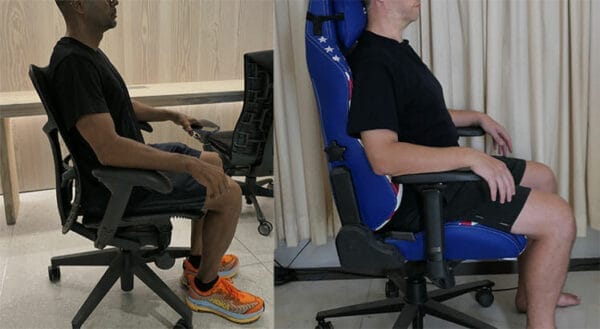
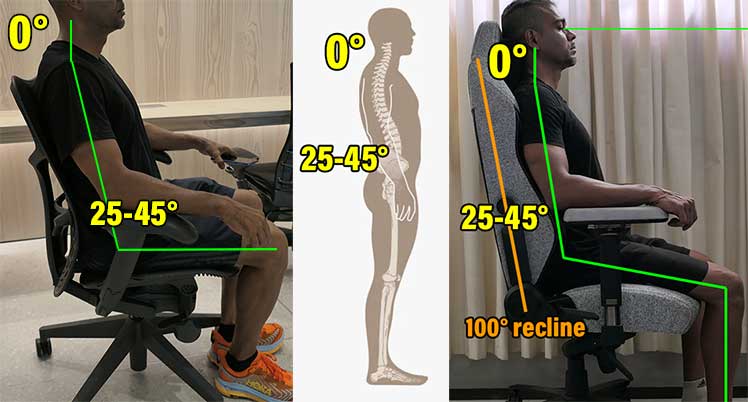
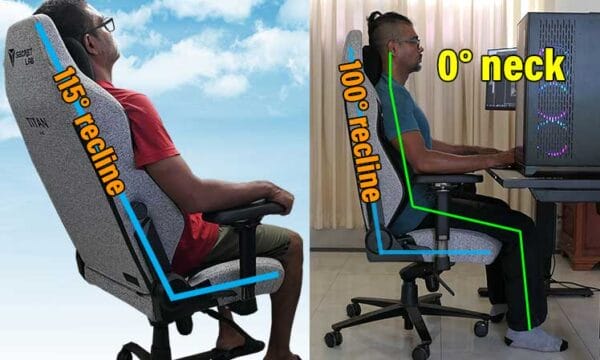
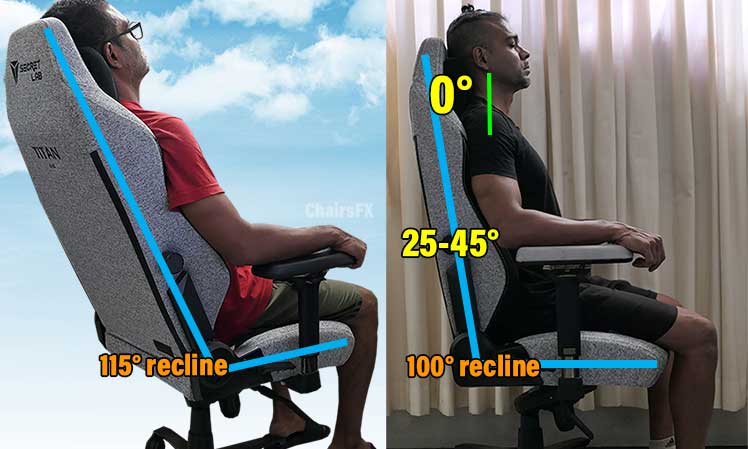
A: I get why this confuses so many people it is not always intuitive! First, adjust your chair height so your feet are flat on the floor, with knees at a 90-degree angle or slightly open. Next, push your hips as far back into the chair as possible. Your lumbar support should fit snugly into the curve of your lower back. Adjust the backrest recline to support an upright but relaxed posture, typically around 100-110 degrees. Position armrests so your shoulders are relaxed and your elbows form a 90-degree angle while typing or using your mouse. Your monitor should be at arm's length, with the top of the screen at eye level. This foundational setup makes a huge difference. Small tweaks can yield big comfort improvements.
3. Q: Are there any common mistakes gamers make that negate the benefits of their ergonomic chair?
A: Oh, absolutely, this one used to trip me up too! The biggest mistake is thinking the chair does all the work. Sitting in a slouched position, even in the best chair, completely negates its benefits. Another common error is neglecting regular movement; staying glued to the seat for hours is detrimental, regardless of chair quality. Incorrect monitor height or distance can also lead to neck and eye strain, undoing any back support. Failing to adjust armrests correctly can cause shoulder and wrist issues. Lastly, ignoring the chair's adjustable features, like not setting lumbar support or seat depth, means you are not utilizing your investment properly. It is an active partnership between you and your chair for optimal posture.
4. Q: How often should I take breaks from gaming to support my posture and overall health?
A: This is super important, truly! Even the most ergonomically perfect setup will not save you from the effects of prolonged static posture. Aim for a quick 5-10 minute break every hour. During these breaks, stand up, stretch, walk around a bit, maybe grab some water. Simple movements like shoulder rolls, neck stretches, and hip flexor stretches can work wonders. The goal is to break the static posture cycle and get your blood flowing. Consider setting a reminder on your phone or using a dedicated app. Consistent short breaks are far more effective than trying to make up for long stretches later. Your body will absolutely thank you, improving both comfort and focus.
5. Q: Can gaming chairs prevent specific back problems like sciatica or herniated discs?
A: While a well-designed gaming chair can support spinal health, it is crucial to understand it does not prevent or cure serious medical conditions like sciatica or herniated discs. These conditions often have complex origins involving genetics, lifestyle, and injury. A good ergonomic chair helps by promoting a neutral spine, reducing pressure points, and minimizing strain that could exacerbate existing issues or contribute to their development over time. However, it is only one piece of the puzzle. Regular exercise, proper lifting techniques, maintaining a healthy weight, and listening to your body are equally, if not more, important. If you experience pain, always consult a healthcare professional. A chair is a tool, not a medical solution.
6. Q: What is the impact of standing desks or desk converters combined with gaming chairs on posture?
A: Combining a standing desk with a gaming chair is genuinely a powerhouse strategy for superior posture and health. It allows for dynamic posture changes throughout your day, which is what our bodies truly crave. You can alternate between sitting ergonomically in your gaming chair and standing comfortably, reducing the detrimental effects of prolonged sitting. This variability helps engage different muscle groups, improves circulation, and reduces spinal load. Look for standing desks that adjust smoothly and remember to wear comfortable shoes while standing. It is not about standing all day, but about integrating movement into your routine. This proactive approach significantly diminishes the risks associated with static desk work. You have got this!
Advanced / Research & Frontier 2026
1. Q: Are there any emerging technologies in 2026 gaming chairs that actively fix posture?
A: This is where things get really exciting for 2026, my friend! While no chair truly forces posture correction, we are seeing some incredible advancements. Smart chairs are integrating pressure sensors and haptic feedback systems, gently nudging you when you slouch or adopt poor positions. Some models are even connecting to companion apps, providing real-time posture analysis and personalized recommendations. There are prototypes with dynamic support systems that automatically adjust lumbar or seat depth based on biometric input. We are also seeing more chairs with integrated heat and massage functionalities for improved circulation and muscle relaxation, which indirectly supports better posture. These intelligent chairs are about guiding, not dictating, healthy sitting.
2. Q: How do biomechanical studies in 2026 inform gaming chair design for posture optimization?
A: This is a deep dive into the science, and it is fascinating how far we have come by 2026! Biomechanical studies are crucial; they use motion capture and pressure mapping to analyze how different sitting positions impact spinal load, muscle activity, and blood flow. Researchers are now developing AI models that predict long-term effects of specific chair designs. This data helps designers create chairs that better accommodate natural spinal curves and distribute pressure more evenly. We are moving beyond one-size-fits-all designs towards chairs that dynamically respond to the user's micro-movements. The goal is to minimize static load on intervertebral discs and reduce muscle fatigue, essentially making chairs that 'understand' your body better. It is about data-driven ergonomics.
3. Q: What is the psychological impact of a bad posture in gaming, beyond physical discomfort?
A: This is a brilliant question, often overlooked, and it is more significant than you might think! A consistently bad posture can actually affect your mood, energy levels, and even your in-game performance. Slouching can lead to reduced oxygen intake, making you feel more fatigued and less alert, which clearly impacts reaction times and decision-making. There is also a psychological feedback loop: poor posture can contribute to feelings of low confidence or stress, subtly impacting your mental game. Conversely, maintaining an upright, open posture has been linked to increased feelings of power and improved cognitive function. It is not just about comfort; it is about your overall state of mind and competitive edge. So, stand tall, even when sitting!
4. Q: How can I integrate core strengthening exercises into my routine to complement my gaming chair's posture support?
A: This is an absolutely top-tier strategy for truly fixing posture, even beyond what any chair can do! A strong core is your body's natural lumbar support system. Simple exercises like planks, bird-dog, and glute bridges are phenomenal. You do not need a gym; just a few minutes a day can make a massive difference. Focus on engaging your abdominal muscles and strengthening your back extensors. Even doing some gentle cat-cow stretches during a loading screen helps. The idea is to build up the muscles that actively support your spine, making you less reliant on the chair alone. Your gaming chair provides passive support, but an active core provides internal, dynamic support. Combine them, and you are unstoppable!
5. Q: What role do monitor setup and peripheral placement play in conjunction with a gaming chair for optimal posture?
A: This is a crucial area often underestimated, and it is 100% interconnected with your chair's effectiveness! Your monitor should be positioned so the top third of the screen is at eye level, approximately an arm's length away. This prevents neck strain from looking up or down. Your keyboard and mouse need to be close enough so your elbows remain at a 90-degree angle, with wrists straight and relaxed. An oversized desk or awkward peripheral placement can force you into uncomfortable positions, completely negating any good posture your chair tries to provide. Investing in a monitor arm can give you superb flexibility. It is all about creating a harmonious ecosystem where every component supports your ergonomic goals. It is an entire setup, not just one piece.
Quick 2026 Human-Friendly Cheat-Sheet for This Topic
- Your gaming chair is a tool, not a magic posture fix. Use it wisely!
- Adjustability is your best friend make sure your chair fits you.
- Sitting perfectly still for hours is still bad, even in the best chair. Move it!
- Feet flat, knees at 90 degrees, monitor at eye level these are your posture commandments.
- Strengthen your core; it is your body's built-in ergonomic support.
- Do not forget proper desk setup; monitor and peripherals are key players.
- Listen to your body; if something hurts, adjust or take a break!
- Basketball Games Tonight Your Quick Guide
- Free Games Downloaded: Are They Safe to Play Today?
- Tornado Alley Roblox: Can You Survive the Storm?
- MK Skins Fortnite Are Mortal Kombat Fighters Coming
Gaming chairs aim for support but do not automatically fix bad habits. Proper adjustment and active engagement are crucial. Ergonomic features like lumbar support and headrests can help, but a good chair is not a magical cure. Regular breaks and exercises remain vital for long-term spinal health.
How To Sit In A Gaming Chair Healthy Neutral Positions YouTube Do Gaming Chairs Really Make A Difference ChairsFX Gaming Chair Posture Support 680x279 Good Posture Gaming Chair At Eloise Rameriz Blog Are Gaming Chairs Good For Your Back And Posture Min
Gaming Chair User Guide Enjoy Comfortable Good Posture User Manual 2021 Intro The Perfect Seating How To Sit Properly In A Chair For Good Posture Does Gaming Chair Help Back Pain 1690048558 Do Gaming Chairs Really Make A Difference ChairsFX Good Vs Bad Posture Gaming Chair 600x416 Gaming Posture 7 Tips For Better Health Esports Healthcare Gaming Posture Feature 1024x512
Good Posture Are Office Chairs Better For Gaming How Would You Improve C7 20241014 Mobile 5 Tips To Get The Most Of Your Secretlab Chair Secretlab Blog Wrong Posture Gaming Chair User Guide 7 Best Practices For First Timers Titan Neutral 2023 600x360 Gaming Chair Posture Step By Step Dynamic Neutral Sitting Aeron Gesture Titan 600x267
The Best Gaming Chairs Of 2025 Tried And Tested Trans Gaming Chair Posture Health Benefits For Men Women Kids Upgrade Office Vs Gaming 600x378 5 Best Gaming Chairs 2026 Gaming Net Razer Iskur X Good Posture Are Office Chairs Better For Gaming How Would You Improve Reclining Vs Slouching
Gaming Chair User Guide For ALL PC Gaming Chair Models ChairsFX Gaming Chair Support Cushions Gaming Chair Posture Have A Better Gamer Posture TK Ad0qXkR0 Do Gaming Chairs Really Make A Difference ChairsFX Gaming Chair How To Sit Using A Neutral Style In A Gaming Chair ChairsFX Dynamic Gaming Chair
Gaming Chair User Guide For ALL Gaming Chair Models ChairsFX How To Sit In Gaming Chair Article Are Gaming Chairs Good For Your Back Here S The Truth 2026 Are Gaming Chairs Good For Your Back How Do Gaming Chairs Support Posture In 2025 How To Watch All The A Quiet Place Movies In Order Viewing Guide Best Gaming Chairs For Posture
Gaming Vs Ergonomic Office Chair Neutral Postures Compared Neutral Compare Feature How To Sit In A Gaming Chair Neutral Posture QuickStart How To Sit 2022 Intro Gaming Chair Posture Have A Better Gamer Posture Goldy Copy Of Add Text To Inline Images 76 2048x1152 Best Gaming Chair For Good Posture At Carolyn Pless Blog Featured Image Without Subtitle 20
Best 5 Gaming Chairs That Are Cheap Best Options In 2020 It S Gaming Chair Posture Benefits Why Gaming Chairs Are Good For The Back Neck And Posture Titan Vs Mirra Neutral Gaming Chair Posture Step By Step Dynamic Neutral Sitting Anil Vs George 600x329 GTPLAYER Gaming Chair Review In 2026 Best Budget Gaming Chair Fix Wobbly Arms On Your Gaming Chair
Gaming Chair User Guide 7 Best Practices For First Timers Chair Height Examples Gaming Posture Correct Gaming Posture Incorrect Gaming Posture B3eGaming Chair Benefits For Wellness And ChairsFX Gaming Chair User Guidet